
Quantization in Computer Vision
Your model runs 2–4× faster after quantization. Memory drops. Latency improves. Deployment becomes possible on edge devices. Quantization changes how your model represents information. Without understanding where that error comes from, you cannot tell which case you are in.
 Tilov Raykhonov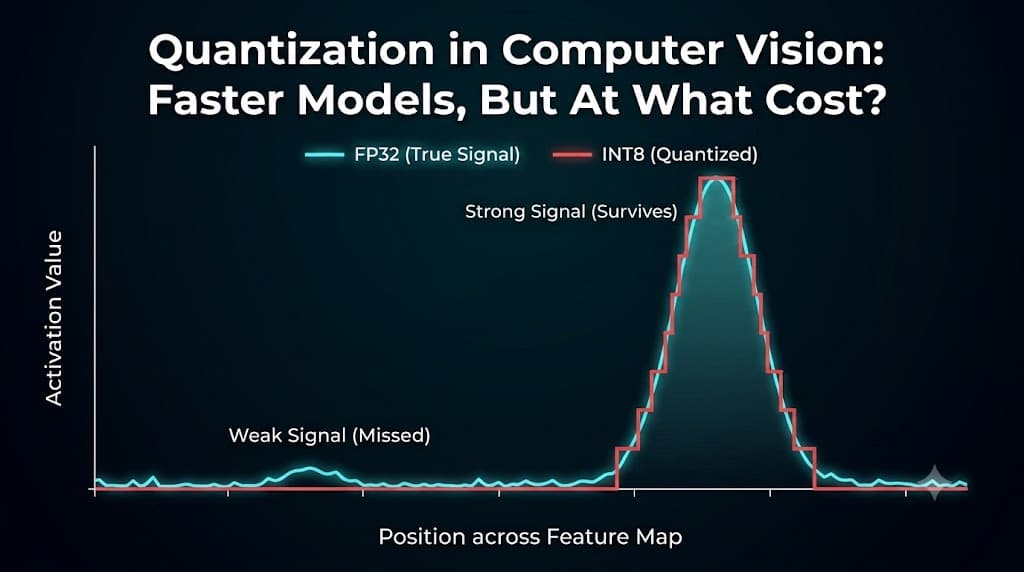
What Quantization Is Actually Doing
At its core, quantization maps continuous values to discrete ones:
- float32 → int8 (or float16, fp8, etc.)
- using:
- scale
- Zero-point

Instead of storing exact values, we store an approximation:
- compute happens in integer space
- precision is reduced
- efficiency increases
This can be applied to:
- weights (model parameters)
- activations (intermediate outputs)
A Quick Intuition
Think of your model as working with very precise numbers.
In float32, it can represent values like:
0.1370, 0.1382, 0.13821
Suppose the values in this tensor range from 0.1 to 0.2. During UINT8 quantization, these values are mapped to one of 256 discrete integer levels (0–255). For example:
Float32 | Int8 |
0.1370 | 94 |
0.1382 | 97 |
0.13821 | 97 |
Notice that 0.1382 and 0.13821 are represented by the same integer value, making them indistinguishable to the quantized model.
You are rounding aggressively.
One rounding doesn’t matter. But deep learning models apply thousands of operations. Small errors accumulate, interact with non-linear layers, and sometimes get amplified.
Most models tolerate this noise surprisingly well, but not all.
When Quantization Works Well
1. Your model has redundancy
Deep learning models are heavily overparameterized. Not every weight is critical on its own, and small changes to individual values often do not affect the final prediction much.
Quantization takes advantage of this.
Instead of storing weights in high precision formats like FP32, we store approximate versions using lower precision formats such as INT8 or FP16.

Each weight is converted from a 32-bit floating-point number into an 8-bit integer (0-255). Imagine stretching the tensor's value range (-4.7 to 5.64) across the available integers 0-255. Two numbers define this mapping:
- Scale (S ≈ 0.04): how much one integer step represents.
- Zero-point (Z = 116): which integer represents the real value 0.
The conversion is then performed using:
q = round(r / S + Z)
As a result, -4.7 becomes 0, 5.64 becomes 255, and every other value is mapped proportionally to an integer in between.
The values become less precise, but the model often behaves almost the same.
Metric | Higher Precision (e.g., FP32) | Lower Precision (e.g., INT8) |
Accuracy | Better: Maintains the full mathematical nuance of the trained model. | Lower: Small rounding/scaling errors can lead to slight drops in accuracy. |
Memory | More: Requires 32 bits (4 bytes) per weight, leading to massive file sizes. | Less: Requires only 8 bits (1 byte) per weight—a 75% reduction in size. |
Inference | Slower: Floating-point math is computationally expensive for CPUs/GPUs. | Faster: Integer math is much simpler and hardware-optimized for speed. |
Power | Higher: Moving 32-bit data and processing it drains more battery/electricity. | Lower: Smaller data movement and simpler logic are highly energy-efficient. |
2. You are doing image classification
Quantization works especially well for image classification models because predictions depend on global patterns rather than exact individual values.
A classifier does not usually rely on one precise pixel or one exact weight. Instead, it learns broader features such as shapes, textures, and patterns across the entire image.
Because of this, small numerical errors introduced by quantization often get averaged out.
A real-world example: INT8 quantization barely dents classification accuracy. On ImageNet, standard reference models lose only two to three tenths of a percent in top-1 accuracy when quantized from FP32 to INT8:
Model | FP32 top-1 | INT8 top-1 | Drop |
ResNet-18 | 69.76% | 69.49% | -0.27% |
ResNet-50 | 76.13% | 75.92% | -0.21% |
MobileNetV2 | 71.88% | 71.66% | -0.22% |
ImageNet-1K, top-1, 224px center crop. INT8 weights from the torchvision model zoo (ResNets via post-training quantization; MobileNetV2 via quantization-aware training).
Because a classifier relies on broad, redundant features rather than exact values, the rounding error introduced by quantization is largely absorbed — the model behaves almost identically while using a quarter of the memory.
3. You have device constraints
Quantization shines when:
- memory is limited
- latency is critical
- hardware favors integer ops
In many real systems, quantization is not optional—it’s required.
Real-World Mobile Benchmark: Precision Tiers on the Snapdragon® 8 Gen 3
To see the direct impact of physical device constraints, look at the production benchmarking data for a lightweight object detector (YOLOv8-N at $640 \times 640$ resolution) deployed on a flagship mobile device powered by the Snapdragon® 8 Gen 3 Mobile NPU using the ONNX runtime:
Model Precision | Technical Meaning | Model Size (Disk) | Inference Latency | Peak Memory Range |
float (Baseline) | Unquantized weights and activations. | 12.2 MB | 5.37 ms | 5 - 217 MB |
w8a16 | 8-bit weights / 16-bit activations. | 3.60 MB | 2.919 ms | 0 - 83 MB |
w8a8 | Fully Quantized (8-bit weights & activations). | 3.25 MB | 1.012 ms | 0 - 62 MB |
What This Mobile Data Shows
- Unlocking Specialized Silicon: You aren't just quantizing to save disk space; you are doing it to speak the hardware's native language. As the data shows, moving from float to w8a8 allows the model to map cleanly into the specialized integer vector engines on the NPU, dropping inference time down to an incredible 1.012 ms.
- Bypassing the Thermal Wall: Look at the Peak Memory Range. The unquantized baseline spikes up to 217 MB, forcing massive data movement across the chip which quickly generates device heat. Fully quantizing the model to w8a8 caps peak memory usage at just 62 MB. This drastically reduces power consumption, allowing your app to run fluidly without triggering the device's thermal throttling limits.
- The App Store Delivery Win: Beyond runtime performance, mobile application ecosystems penalize heavy apps with cellular download warnings. Shrinking your model footprint from 12.2 MB down to 3.25 MB keeps your application nimble, fast to install, and lightweight on user storage.
The Takeaway: We don't quantize models because they run poorly on our desktop development setups. We quantize them because it is the exact key required to unlock mobile accelerators and fit inside the unforgiving physical boundaries of smartphone hardware.
When Quantization Breaks (And Why)
This is where most real-world issues appear.
1. Activation distributions are messy
Quantization assumes values fit nicely in a range.
In reality:
- activations have outliers
- distributions are skewed
To fit into int8, values are clipped.
That means:
- extreme values are lost
- important signals may disappear
Quantization preserves range, not importance.

Real activations are skewed and have outliers. To fit everything into int8, the scale must span from 0 all the way out to the outliers (~14 here). Shown with 16 levels for clarity — int8 has 256, but the geometry is identical — only ~3 of them land on the region where the signal actually lives. The outliers are preserved; the meaningful values get crushed into a handful of levels. Quantization preserves range, not importance.
2. Small signals disappear (critical for CV)
In detection and segmentation, models often rely on weak signals.
After quantization:
- small values → rounded to zero
- subtle features → gone
Result:
- missed small objects
- degraded recall
This is why detection is more sensitive than classification.

With a coarse int8 step (~0.8 here, set by the layer's wide range), every activation below 0.4 rounds to zero. The large object stays; the weak activations of the small object — and the subtle texture — collapse to the same level (0) and vanish. In detection and segmentation, that is a missed object and lost recall.
3. One scale does not fit all (per-tensor issue)
Using a single scale for a whole tensor:
- mixes very different distributions
- suppresses important channels
Per-channel quantization improves this—but adds complexity.
- More metadata: a separate scale per channel instead of one per tensor, which has to travel with the model and be applied at every layer
- Costlier rescaling: the per-output rescale becomes a vector operation broadcast across channels, not a single multiply
- Patchy hardware/runtime support: many NPUs and older runtimes support per-channel only for weights — or not at all — and ONNX/TFLite/TensorRT each represent it differently, so models can break on export
- Weights only, in practice: activations change with every input, so per-channel is standard for weights but rarely usable for activations
In short: per-channel moves the cost from accuracy to deployment complexity.
Decision cheat sheet — quantization by task
Task / domain | Quantize? | Main risk | Recommended approach |
Image classification | Usually safe | Minimal - redundant global features absorb error | INT8 is usually enough |
Object detection (general) | Need to validate | Confidence & box regression shift slightly | check mAP |
Small / distant objects | Caution | Weak signals round to zero - recall falls | keep sensitive layers higher precision |
Segmentation | Need to validate | Boundary precision drops (mask mAP at high IoU) | Validate mask metrics; per-channel weight quant |
Pose / depth / super-res / denoising | Caution | Pixel-precise outputs expose rounding error | Prefer FP16 |
Generative (diffusion / GAN) | Caution | Error compounds over many steps - artifacts | Mixed / selective precision |
Edge deployment (any HW-limited target) | Often required | Depends on the task above | Match scheme to hardware (INT8 for NPUs) |
The benefit is roughly the same everywhere about 4× smaller weights and faster integer math.
Summary
Quantization is one of the most practical tools for deploying computer vision models.
It can make the difference between:
- a model that stays in research
- and one that runs in production
But it is not a free optimization.
It is a tradeoff between efficiency and numerical precision.
Before applying it, ask:
- Do I understand my activation distributions?
- Is my calibration data representative?
- Is my task sensitive to small signals?
- Have I tested under real-world conditions?
Quantization doesn’t just make your model smaller.
It changes how your model behaves.
The question is not whether it works.
The question is whether it works for your model.
References
- PyTorch — torchvision Models and pre-trained weights (FP32 and INT8 top-1 accuracies). https://docs.pytorch.org/vision/stable/models.html
- B. Jacob, S. Kligys, B. Chen, et al. — Quantization and Training of Neural Networks for Efficient Integer-Arithmetic-Only Inference, CVPR 2018. https://arxiv.org/abs/1712.05877
- Qualcomm AI Hub — YOLOv8-Detection Model Optimization and On-Device Hardware Benchmarks. https://aihub.qualcomm.com/automotive/models/yolov8_det
Keep reading
Confidence Intervals for Object Detection: Why mAP Alone Isn't Enough
mAP looks definitive, but in object detection it’s only an estimate. Confidence intervals reveal how much uncertainty those numbers hide.


Choosing the Right Camera for CV Application
When building a face recognition–based attendance system, the camera is not just an accessory — it's the foundation of your entire pipeline.