
Tailscale - One Tool, Less Infrastructure
You have multiple devices like a laptop, a production server, maybe an edge server. Accessing your work devices from outside your network usually requires port forwarding, dynamic DNS services, or a VPN, this usually raises security concerns as setting those up requires your public IP to be exposed.
Tailscale makes this simple. Install it on your devices and sign in. They can now reach each other securely from anywhere.
What Is Tailscale?
Tailscale creates a secure network between your devices. Your devices connect directly to each other (peer-to-peer), not through a central server. This means faster speeds and no single point of failure.
Install it on your laptop and work server. Sign in with your Google account on both. Now you can ssh servername from a coffee shop and it connects like they're on the same local network.
No port forwarding. No complex configs. No networking knowledge required.
Beyond being a VPN that actually works, Tailscale replaces several tools: dynamic DNS for device names, ngrok for sharing localhost, and firewall rules for access control.
Access Devices by Name
Replaces: Custom DNS servers, memorizing IPs, updating hosts files
Setting up Pi-hole or bind9 just to give your devices readable names? Updating DNS records every time you add a machine? Memorizing 192.168.1.142 because you're too lazy to configure it properly?
MagicDNS does this automatically:
ssh servername
Every device gets a name. No server to maintain, no records to update, no IPs to remember.
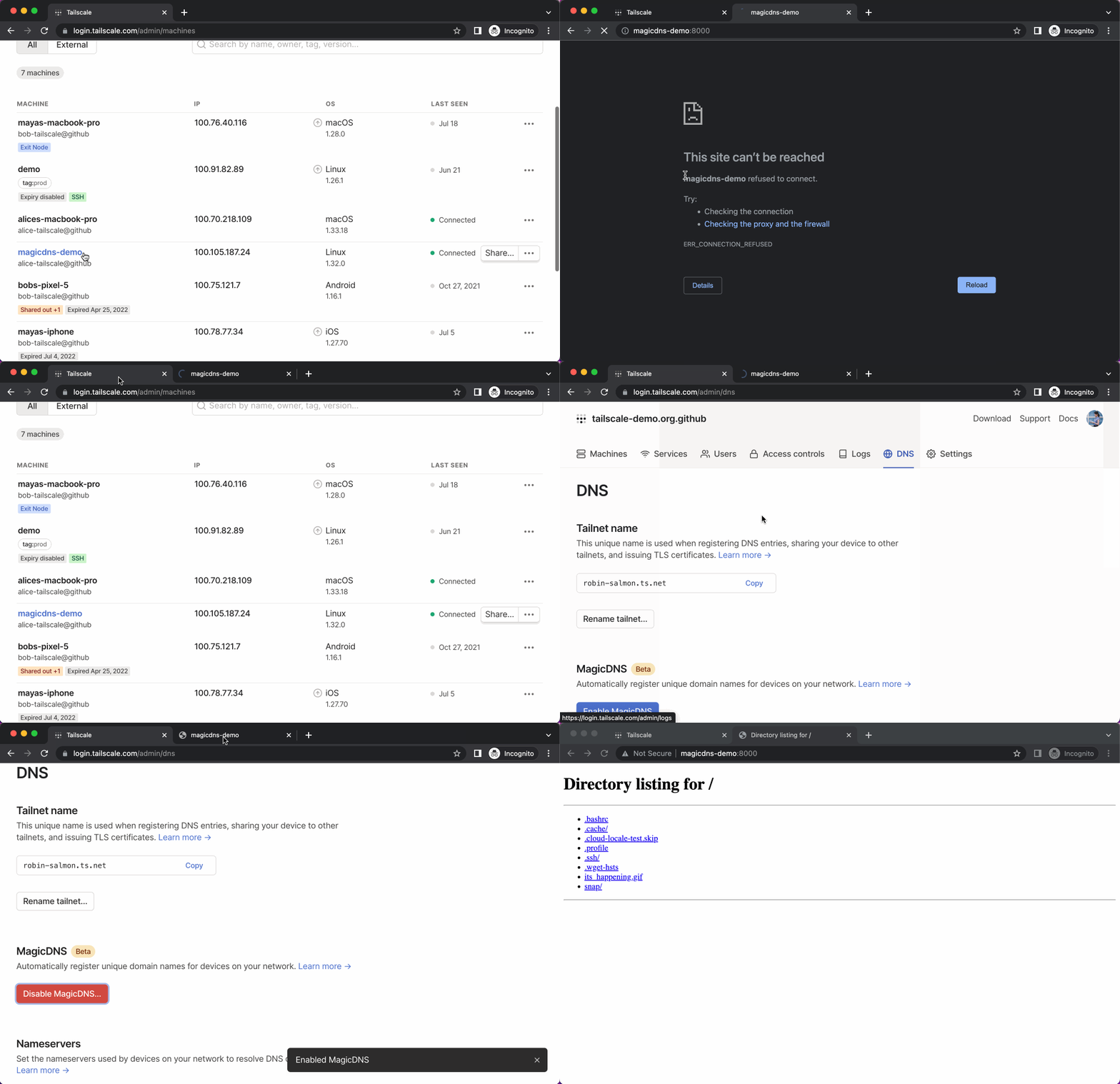
Type http://nas to reach your NAS. Type ssh work-laptop to reach your work machine. The names just work.
Share Local Services Publicly
Replaces: ngrok, localtunnel, port forwarding
You know the drill with ngrok: random URLs that change every time you restart, rate limits on the free tier, paying $8/month if you want a stable subdomain.
Tailscale Funnel:
tailscale funnel 3000
Your local dev server is now at https://my-laptop.tailnet-name.ts.net. Permanent URL. Free. No rate limits.
Testing webhooks from Stripe? Demoing a feature to a client? Running a side project on your work server? One command handles it.
If you want to share something with just your team (not the whole internet):
tailscale serve 3000
Same thing, but only people on your Tailscale network can access it.
Control Who Reaches What
Replaces: Firewall rules, iptables configs, security groups
SSHing into each server to configure iptables. Documenting which ports are open where. Breaking production because you fat-fingered a rule at 2 AM.
Tailscale ACLs are just a JSON file:
{
  "grants": [
    {
      "src": ["[email protected]"],
      "dst": ["tag:staging"],
      "ip": ["5432"]
    }
  ]
}
This contractor can access your staging database (port 5432). Nothing else. When they're done, delete the line. No leftover rules hiding on some forgotten server.
Team-based access:
{
  "grants": [
    {
      "src": ["group:sre"],
      "dst": ["tag:prod"],
      "ip": ["22"]
    }
  ],
  "groups": {
    "group:sre": ["[email protected]", "[email protected]"]
  }
}
Your SRE team can SSH into production. Everyone else can't. Alice leaves the company? Remove her email. Policy updates everywhere instantly.
No more SSH key distribution across 50 servers. No more "wait, which subnet is staging?" No more firewall rules that you're afraid to touch because nobody remembers why they exist.
Run Services Anywhere
Replaces: Load balancers, DNS updates, hardcoded hostnames
You're running a database on db-server-01. That hostname is hardcoded in your configs. Server dies, you spin up db-server-02, and now you're doing find-replace across your codebase at midnight.
Or you set up HAProxy. Configure health checks. Set up DNS. Maintain yet another piece of infrastructure.
Tailscale Services:
tailscale serve --service=svc:postgres-main --tcp 5432 localhost:5432
Your database is now at postgres-main.corp.ts.net. Server dies? Run the same command on a new machine. The DNS name stays the same. Your apps reconnect automatically.
Multi-region example:
# Primary (US)
tailscale serve --service=svc:db-primary --tcp 5432 localhost:5432

# Replica (EU)
tailscale serve --service=svc:db-replica --tcp 5432 localhost:5432
Apps write to db-primary.corp.ts.net and read from db-replica.corp.ts.net. Primary goes down? Promote the replica and re-advertise it as primary. No config changes needed anywhere.
You can also control who accesses these services:
{
  "grants": [
    {
      "src": ["group:backend-team"],
      "dst": ["svc:postgres-main"],
      "ip": ["5432"]
    }
  ]
}
Backend team can reach the database. Frontend team gets blocked automatically.
No More Traditional VPNs
Central VPN server that's a bottleneck and single point of failure. Slow speeds because everything routes through one location. Complex setup with certificates and subnet planning. "VPN is down" means everyone's locked out.
Tailscale creates direct peer-to-peer connections. Your laptop talks directly to your server. No central bottleneck. Uses WireGuard encryption without the WireGuard complexity.
Setup is install, sign in, done. Takes 2 minutes. Devices can still connect to each other even if Tailscale's coordination server has issues (it handles the initial introduction, then gets out of the way).
Why This Matters
Networking tools usually force a choice: simple but insecure, or secure but complex. Port forwarding is easy but leaves your services exposed. VPNs are secure but a pain to set up and maintain.
Tailscale doesn't make you choose. It's secure by default (WireGuard encryption, identity-based auth, ACL policies) and actually easier to use than other alternatives.
You're replacing DNS servers, ngrok subscriptions, firewall configurations, VPN infrastructure, and SSH key management with one tool that takes 2 minutes to set up.
Get Started
Download from tailscale.com/download. Install on two devices. Sign in. They'll find each other automatically.
# See your devices
tailscale status

# SSH into another machine
ssh machine-name

# Share something publicly
tailscale funnel 8080

# Share with just your team
tailscale serve 8080
Two minutes to set up. Zero maintenance required.